
1,260 credits used
- Content ideas collected from conversations6 h estimated human effort24
- Existing ideas enriched with new conversation insights1.5 h estimated human effort9
- LinkedIn post drafts prepared3 h estimated human effort6
AI software for your business
ConnectWunder connects contacts, conversations, knowledge and tasks. So AI can take on operational work and you can move your business forward.
For online entrepreneurs. Solo or with a team.
Click an AI worker.
Turn your expertise into your next post.
More time for conversations. Your AI team handles the preparation.
Turn agreements into clear next steps.
Turn your expertise into your next post.
Fictional sample values. Hours estimate the human effort for the same tasks, not actual time saved. Results may appear in several areas and are not added into a company total.
1,260 credits used
580 credits used
410 credits used
More time for conversations. Your AI team handles the preparation.
Fictional sample values. Hours estimate the human effort for the same tasks, not actual time saved. Results may appear in several areas and are not added into a company total.
1,480 credits used
920 credits used
640 credits used
Turn agreements into clear next steps.
Fictional sample values. Hours estimate the human effort for the same tasks, not actual time saved. Results may appear in several areas and are not added into a company total.
760 credits used
360 credits used
Product preview with simplified interactions and illustrative results. No live execution.
What should AI do for you?
Turn “AI could help” into a concrete job. See what you can hand over and what your business gets back.
Sales conversations
Your prospect hesitates. Your salesperson needs to uncover what is stopping them from buying.
AI follows the conversation through FlowListnr, identifies unanswered questions and suggests the next step to your salesperson.
Have better conversations and turn more prospects into customers.
Live assistance through FlowListnr with a configured AI worker and knowledge of your offer.
Webinars & challenges
You pay for registrations. When people do not show up, sales opportunities disappear with them.
After registration, your configured workflow welcomes the contact on WhatsApp, confirms the date and picks up questions before the webinar.
Get more registered prospects to experience your offer live.
Connects your registration tool to a configured WhatsApp sending service. You define messages and approvals.
Content & reach
Your ideas are in the video. Now turn them into posts without becoming the entire editorial team yourself.
AI turns your video into posts, captions and carousel copy. A connected publishing tool handles scheduled publication after your approval.
Your voice stays yours. Production no longer eats up your time.
Uses your voice guidelines, a configured content workflow and an external publishing tool.
Choose your example. Outcome first, workflow one click away.
More time for customers. Less work left after hours.
Search old messages beforehand. Update the CRM afterwards. Every call creates another block of work.
AI creates a brief from the contact history, then prepares the summary, next tasks and follow-up after the call.
Uses a connected calendar, recordings and activated AI workers.
Use sales opportunities without having to pay for new leads first.
“Get back to me after the launch.” You meant to follow up. Then everyday work got in the way.
AI finds relevant reasons to reconnect in the contact history and drafts a personal message.
Uses existing contact information and your rules for timing, relevance and approval.
Start a timely conversation instead of searching profiles every day.
An ideal prospect posts something relevant. You only notice after the opportunity has passed.
A connected LinkedIn signal service reports relevant posts. AI links them to your contact and prepares a relevant comment or conversation starter.
Uses an external signal provider and a configured connection. Does not assume a native LinkedIn integration or automatic sending.
Persuade with what your customers actually experience. Without briefing AI from scratch every time.
Customers send you great feedback. You still have to hunt it down for the next workshop.
AI searches your stored customer knowledge for relevant testimonials, recurring objections and examples for your offer.
Works with the feedback and conversations you make available in ConnectWunder.
A full working day does not have to turn into a second shift at your desk.
You have looked after your customers. Reports and messages are still waiting for you.
AI prepares replies and reports from your conversations and business knowledge. Review drafts instead of starting with a blank page.
Messages come from connected channels or from you. Email access and sending require a suitable configured connection.
Less coordination. Faster decisions that keep work moving.
Several conversations and chats leave everyone with different information. The business is waiting for a decision.
AI summarizes the current situation, unanswered questions and agreed tasks from your shared context.
Uses your team’s connected conversations, documented decisions and tasks.
Less searching and fewer questions about missing documents.
Invoices sit in different inboxes. Gathering them is still your job.
A configured workflow collects receipts from approved sources, organizes them and prepares the handover to your bookkeeper.
Requires access to receipt sources and your bookkeeping tool. Your bookkeeper remains responsible for professional review.
Spend less time planning. Do more of what matters to you.
Customers, your team, new ideas and exercise compete for the same calendar. You work out the plan yourself.
AI drafts your week using your goals, appointments and priorities. Decide what works and put the plan into action.
Uses a connected calendar and your instructions. You review the suggestions.
Examples of configured workflows. ConnectWunder connects your AI to your business knowledge and the tools it needs. You define tasks and approvals; external services are connected as needed.
How ConnectWunder grows with your workNo big setup project
You already have conversations, send messages and make decisions. That is how your knowledge base grows. Not through weeks of data entry before you get anything back.
Connect your calendar. Use FlowListnr for calls and FlowWritr for WhatsApp. You do not have to migrate your old CRM first.
Keep the tools you know.New external calendar contacts are created. Recorded calls and connected WhatsApp conversations add to what ConnectWunder knows about your contacts.
Less data entry. More at your fingertips.Activate the right AI workers. They prepare your next meetings and capture outcomes and next steps. Put the results straight to work.
Arrive prepared. Finish sooner afterwards.Delegate your next task in a conversation
Connect Claude, ChatGPT or Codex to ConnectWunder. Ask your assistant to document important decisions there. For recurring tasks, ask it to set up an AI worker. It asks for the information and access it needs. Review the first results and refine the workflow as you use it.
Start with new conversations or import existing CRM and Digistore data. Activate connections, permissions and the AI workers you want for your workspace. Your knowledge base then grows with use. Additional automations depend on the task and the tools they need.
More capacity for your business
You want to win more customers, test new offers and keep more profit. You need people who sell, decide and put good ideas to work. Not more time spent on notes, data entry and figuring out who handles the next step.
While you sort notes and write follow-ups, the next prospect is left waiting. Let AI analyze conversations and prepare personal messages. Give yourself and your team more time for the conversations that turn into customers.
See an exampleYou have already invested time and money in reaching these people. ConnectWunder records what you discussed. AI uses that context for the next personal contact. Turn 'Get back to me later' into a real conversation again.
See an exampleDefine the recurring work your AI worker takes on. With your instructions, your business knowledge and the right tools. A schedule or event starts the workflow. You do not have to initiate every run yourself.
Explore featuresWhat was promised to the customer? Which offer fits? How do we handle this? Contacts, conversation results and documents belong together in ConnectWunder. People and AI find the information they need for their work instead of coming back to you every time.
Explore featuresYou decide what AI can do on its own and what needs your approval. Results, questions and approvals come together in your inbox. Make the decisions that need your judgment instead of doing every step yourself.
Explore featuresWorking solo? Then it is your own selling time disappearing into admin.
This is where ConnectWunder comes in
Who is this contact? What did you discuss? Which offer fits?
In ConnectWunder, this information belongs together. People and AI work with the same business context. So a single answer becomes a next step.
See it in the exampleYou define the task and review the result.
A new way to build a business
More customers do not have to mean another hire and another layer of management. AI opens up a new way to share the work.
Hire people because you really want them on your team. Not just because someone has to absorb the extra work.
More business
More staff
More management
More business
AI takes on operational work.
The goal: more profit.
Not just a bigger company.
An example from the real app
A briefing should not get lost in a chat. Here it becomes a document linked to the company and contact person.
Save and link the briefing as a document. The assistant confirms its creation directly in the chat.
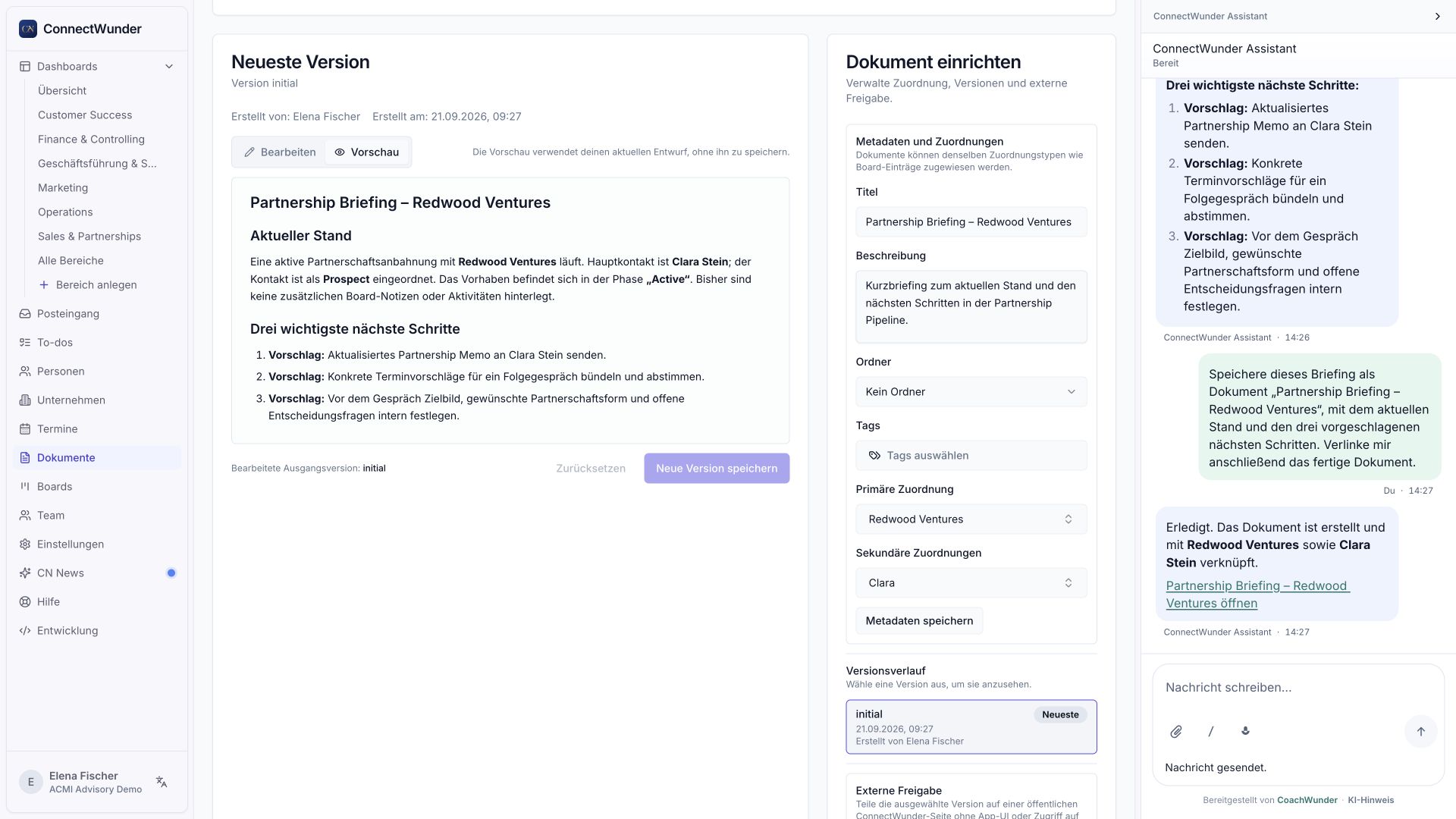
The current status and next steps stay connected to the right contact. No manual copy from the chat is needed.
Crops from the same real capture. Demo data, no live execution on this website.
Your sales department
The sales view brings together people, specialized AI workers, the pipeline and documents. See who belongs to the department and where its work is organized.
Click an AI worker.
Turn your expertise into your next post.
More time for conversations. Your AI team handles the preparation.
Turn agreements into clear next steps.
Turn your expertise into your next post.
Fictional sample values. Hours estimate the human effort for the same tasks, not actual time saved. Results may appear in several areas and are not added into a company total.
1,260 credits used
580 credits used
410 credits used
More time for conversations. Your AI team handles the preparation.
Fictional sample values. Hours estimate the human effort for the same tasks, not actual time saved. Results may appear in several areas and are not added into a company total.
1,480 credits used
920 credits used
640 credits used
Turn agreements into clear next steps.
Fictional sample values. Hours estimate the human effort for the same tasks, not actual time saved. Results may appear in several areas and are not added into a company total.
760 credits used
360 credits used
Product preview with simplified interactions and illustrative results. No live execution.
The tools for your next stage of growth
Manage contacts. Analyze conversations. Move tasks forward. Explore the features for the work you want to hand over.
A good contact is more than an email address. What matters is what they care about, what you agreed on and where you can pick things up.
Contact details, company information and important facts are right in front of you. Get into the conversation instead of searching several tools for the right contact.
Pick up the conversation straight away. See what you discussed before you call. Build on it instead of asking the customer to explain everything again.
Let AI turn existing information into a clear profile. See sooner what matters to this person and what to focus on in the conversation.
Pick up where you left off. Record what connects you and what mattered last time. Make the next contact personal instead of sending a generic follow-up.
Goals, interests, customer status: keep the details you actually need for your offer. You will not have to ask the same questions before the next step.
Let appropriately submitted information flow into the intended contact fields. Your team does not have to type in the same details again.
See which facts are confirmed and where you should ask a question. Avoid building a conversation on an unchecked assumption.
Find the customers, prospects or partners you want to reach, without going through your entire contact list.
See who knows whom. Find a personal route through your existing network to the people you want to reach.
See who is involved at a company and whom your team has already spoken to. Go into the next conversation informed.
Bring duplicate records and their information together. Stop looking in the wrong profile for the last conversation.
Your conversation time is too valuable to spend searching, taking notes and reconstructing everything afterwards. Use it for the person in front of you.
Find upcoming and past conversations with their related information in one place. Preparation no longer starts with a search for your notes.
Find the conversation where the crucial agreement was made. Narrow down the date and participants instead of clicking through the entire meeting list.
Have important contact information and previous conversations collected before the meeting. Start with the customer's concern instead of first having to work out what it was about.
Record decisions, thoughts and images alongside the conversation. Nobody has to guess later what you actually agreed on.
Listen more. Take fewer notes. Turn supported recordings into text. The details remain available for analysis while you focus on the conversation.
Let AI summarize the essentials from long conversations. Find the key points without going through the entire recording again.
Analyze conversations for customer needs, objections or next steps. Get the information you can use to improve your offer and your next contact.
Get short suggestions during the conversation from your configured live assistant. A useful thought reaches you while you can still act on it.
Your old calls contain customer questions and objections. Import existing recordings and use that knowledge for your next offer.
Assign a Zoom display name to the right contact. Future imports use this match so the conversation history reaches the right person.
Connect related bookings, appointments and participant details. Keep one conversation together instead of splitting it across multiple records.
Request recording consent through a dedicated link. Know who has agreed before you start.
A conversation, an offer, a new customer: every step creates more work. ConnectWunder makes progress visible and connects it to the people and actions needed next.
See where prospects, customers and projects stand. Spot what is stuck before an overlooked step becomes a lost deal.
Reflect your actual workflow. Your team can see the next step instead of asking how to proceed with every case.
Show in one move that the next stage has been reached. Everyone sees the new status directly on the board.
Open a case together with the people and companies involved. No need to gather the relevant contact history first.
Budget, deadline, decision: keep the crucial details with the case. Your team has them at hand when work continues.
Fewer questions about the current status. Decisions and next steps stay with the case. Not every handover needs its own conversation.
Keep the offer, brief and attachments with the case. Open the right document instead of interrupting work to search for a file.
Show the cases that need your attention. Urgent work does not disappear among everything else on the board.
Give sales workflows, customer projects and internal tasks a fixed place. Your team can find the right board even as projects increase.
A case reaches the next stage and triggers the automation configured for it. The next step does not always need someone to remember and start it by hand.
Record who takes over, when the result is needed and where a decision is missing. Assign tasks to people or AI workers instead of adding to an ever longer list in your head.
Collect open tasks in one place. Stop piecing them together from meeting notes and memory.
Show what needs to be done first and by when. Important commitments do not get lost among tasks that all look the same.
Give the task to the person or AI worker who should take it on. Clear ownership replaces 'I thought you were handling it.'
See your own tasks or switch to your team's and AI's work. Recognize where you are needed and what someone else has already taken on.
Follow up when it counts. Set a reminder for the relevant item at the time you choose. An agreed response does not disappear in the daily rush.
Questions, mentions and approvals come together in one place. Find the decisions others are waiting for without opening every case.
Bring people or AI workers directly into a question on the case. The context is already there and does not need explaining in another chat.
Start with a prepared draft and the right handover. Review and add to the message instead of writing it from scratch between meetings.
Get important updates on enabled, supported devices. Stop opening the app just to check whether someone is waiting for you.
Analyze conversations, gather information, prepare next steps: give AI a clear assignment and the information it needs. You define how it works and where you decide.
Ask about the contact, content or next step you are working on. Stay with your task instead of first moving its context into another AI chat.
Give your AI the documents you are talking about. No need to laboriously describe the contents of a document or image first.
Assign recurring work to an AI worker with a clear brief. Specify the result you want instead of doing the same task yourself again and again.
Describe the work you want to hand over. Get suitable agent suggestions instead of starting with an empty configuration.
Use an available template as the starting point for your workflow. Adapt it to your work instead of building the basic structure yourself.
Give your AI worker your way of doing things. It has the steps for its job without you explaining them again on every run.
Start configured tasks hourly, daily or weekly. Recurring work does not wait until you find time to initiate it.
A new contact or a finished transcript starts the relevant workflow. AI begins when the event occurs, not when you next look at your task list.
Start the relevant AI task right at the contact, meeting or board item. No detour through a general agent list.
Have several upcoming conversations prepared individually. Bring the right background into each meeting instead of frantically searching for notes between calls.
Give your AI worker the approved connections and information for its job. It can carry out work instead of only explaining how to do it yourself.
Delegate and stay in control. Decide what AI can do on its own and when it needs your approval. Review important decisions, not every manual step.
When your AI worker needs information, answer its question. Work continues without you having to rewrite the entire assignment.
See what is running, which results are ready and where work is stuck. Recognize where to intervene instead of leaving your AI working out of sight.
Get suggestions for improving an agent and decide what to adopt. Develop the existing workflow instead of rebuilding it whenever a weakness appears.
Your best answers, processes and conversation results already exist. Keep them so people and AI can reuse them. For the next customer, the next task and the next offer.
Record your process as a readable guide. Your team can work with it without you having to explain everything again.
Bring in readable content from existing files. Make your knowledge usable without typing it all out again.
Connect briefs, reports and results with the right contact or company. The relevant document is ready for the next conversation.
Organize documents so you and your team can find them again. Good work should not have to be repeated just because its result has disappeared.
Open earlier versions and see what changed. No need to reconstruct the previous state from memory.
Have reports and analyses saved directly as documents. The result stays available for the next task instead of getting lost in an AI chat history.
One link and the other person can read. Share selected content without setting up another workspace account.
Your link stays the same. The content grows with you. Choose to always show the latest version. Stop sending new files after every change.
Download your text as Markdown and use it outside ConnectWunder. Your content is not limited to one tool.
Search across contacts, companies, meetings, boards and documents. Find information without first knowing which section it is in.
People and AI need the same picture to keep tasks moving. ConnectWunder keeps shared work together and lets you define who can access what.
Work with the same contacts, cases and results. Your team starts from what is already known instead of gathering information multiple times.
Invite the people who should collaborate and assign them the right role. Give them a place in the workspace without sharing one login.
Decide who can access which boards. Work together without exposing every case to everyone.
Choose German or English for your interface. Work in the language you can navigate quickly.
Hide the sections you do not need. See the work that matters right now instead of the software's entire feature list.
Open ConnectWunder from its app icon on your desktop or smartphone. Your workspace is at hand without searching for the right browser tab.
See how many credits are available and what they are used for. Understand which work uses your budget and plan your further usage.
Your business does not stop at one tool
Appointments, conversations and tasks belong together. Connect the tools you already work with and give your AI the access it needs.
Two desktop apps. One shared context.
What your customer says helps with your next conversation and your next reply. FlowListnr and FlowWritr bring that context into ConnectWunder.
Record conversations on your computer and use them in ConnectWunder. Stay in the conversation. Afterwards, the information is available for preparation, analysis and next steps.
Recording through FlowListnr
 Zoom
Zoom Google Meet
 FaceTime
 WhatsApp
Your call runs on your computer? FlowListnr can capture it, regardless of the calling tool.
Separate desktop app with ConnectWunder sign-in. macOS releases, Windows Early Beta. Captures calls on your computer, rather than using a native integration with each calling provider shown.
Connect your WhatsApp communication to ConnectWunder through FlowWritr. Use the context you already have to prepare relevant replies, instead of digging through old messages every time.
WhatsApp through FlowWritr
Messages with the right business context.
Your customer does not have to explain everything all over again.
Separate desktop app with ConnectWunder sign-in. macOS releases, Windows Early Beta. WhatsApp connects through FlowWritr. Selected communication content and prepared drafts connect to your workspace.
Your familiar AI. With context from your business.

Via MCP
Claude knows your working context.
Find contacts, summarize meetings and carry out authorized tasks directly in ConnectWunder.
ConnectionMCP connection. Setup depends on the client.

Via MCP
Your questions meet your real business data.
Use authorized contacts, boards and documents as the basis for answers and actions.
ConnectionMCP connection path. Depends on the connector features available to your account.

ConnectWunder plugin
Your instruction becomes work done.
Have your workspace reviewed, content created and requested changes carried out.
ConnectionOfficial ConnectWunder plugin with OAuth sign-in
From booking to follow-up: use information from the tools you already work with.
Direct connection
Your appointments bring their context.
Bring in meetings, prepare conversations and let suitable AI tools work with your calendar.
ConnectionDirect calendar integration

Direct connection
Your calendar becomes part of your workflow.
Connect appointments with contacts and preparation. Stop maintaining the same information twice.
ConnectionDirect calendar integration

Via webhook
Booked. And the next step can begin.
Bookings and cancellations arrive in ConnectWunder with participant information.
ConnectionWebhook setup required
Direct connection
Your conversations keep working for you.
Bring in cloud recordings and transcripts for summaries, insights and further workflows.
ConnectionDirect integration through a configured Zoom app
Extend your workflows through configured interfaces and automations.

Via API / webhooks
An event starts your workflow.
Let changes in ConnectWunder trigger the next steps in your connected tools.
ConnectionThrough webhooks and API calls you configure

Via API / webhooks
Build workflows that save you manual steps.
Connect ConnectWunder to your own steps and additional services.
ConnectionThrough webhooks and API calls you configure

Via API / webhooks
Your tools pass the work along.
Connect ConnectWunder to your Zaps so information moves between tools and the next step can start.
ConnectionThrough webhooks and API calls you configure. No dedicated ConnectWunder module required.
Via MCP
Give your AI workers the right tools.
Extend their capabilities with compatible, approved services.
ConnectionAdditional external MCP servers. Configurable connections with authentication and tool checks.
Via API / webhooks
Your systems pass information along.
Connect contacts, meetings, boards and documents with your own applications.
ConnectionPublic API and webhooks for your own software and other automation platforms
Via data feed
Maintain once. Use in several places.
Supply connected pages with selected, up-to-date content from your boards.
ConnectionPublic board data feed and shared document links for websites, directories and internal tools
Providers for AI processing and speech. Separate from the AI assistants you use to work with ConnectWunder.

AI processing
Let your AI think and work with you.
Turn existing information into answers, analyses and concrete results.
ConnectionDirectly used for AI agents and further AI processing. Your own key where enabled.

AI processing
Spoken words become usable knowledge.
Turn conversations into text and distinguish between speakers.
ConnectionFor supported transcription, speaker identification and live audio processing. Your own key where enabled.
Discuss tasks in your workspace or use your assistant on the go.
Companion assistant
Help right where you work.
Discuss your next task with an assistant that can access your authorized workspace.
ConnectionEmbedded assistant in ConnectWunder
Companion assistant
Your assistant comes with you.
Connect the mobile app to your workspace and use it on the go.
ConnectionWorkspace enablement and personal connection code required. Test access planned.
Setup depends on the connection. Separate apps, account features and enablement may be required. This overview describes connection paths, not access to every connection in every plan.
ConnectWunder as an app
Open contacts, tasks and conversation history straight from the app icon. On your phone as well as your computer. With notifications that keep you up to date.
ConnectWunder is an installable web app, also called a PWA. Add it to your home screen or dock, then open it like your other apps. No separate installer to find. No app store account needed.
Open ConnectWunderMenu labels vary by device and browser. Allow notifications if you want to receive them. On iPhone, web push requires an installed web app and iOS 16.4 or later.
This is ConnectWunder itself. FlowListnr for call recording and FlowWritr for WhatsApp remain separate desktop apps.
 ConnectWunder
Your working day
What you discussed last time. What is still open.
Review the draft instead of writing the message from scratch.
Stay up to date on the go.
AI workers for the work that takes up your day
ConnectWunder is more than a place to manage contacts. Your AI workers handle recurring work, giving you and your team room to serve more customers and put new ideas into action.
More time for your next customer conversation.
Sell with context instead of doing the research yourself.
Show up consistently without starting from scratch.
Put your own work into numbers
Choose an example and adjust the assumptions.
Prepare notes, next steps and follow-ups.
Illustrative values, not measured customer results. Include your review and editing time.
Please enter valid values. Review time cannot exceed your current time per task.
Your monthly capacity
for customers and new business ideas.
8 h × €50 / h
Estimate based on your inputs. Not guaranteed profit or direct cost savings. Plan fees and AI usage have not been deducted.
Start with a task that takes up time every month. Choose your plan by AI usage, not by the size of your team.
Example volumes are not tied to a plan. Credit usage depends on the task, amount of data and AI model.
No per-user pricing
Choose the plan that fits your working day. From your own conversations and tasks to ongoing AI work for your team.
What is that time worth to you? Calculate it
For solo entrepreneurs and small setups
You lead the conversations, maintain relationships and move your offer forward. Core is your starting point for handing recurring work over to AI.
149 €per month
Typical ways to use it
10,000 Creditsper month
For your own regular usage
AI support with ticket escalation
Get CoreFor teams with typically 2 to 5 active people
Several people work on sales and customer service. Team gives you more usage budget so AI can take on ongoing work and handovers do not stall over missing information.
599 €per month
Typical ways to use it
42,000 Creditsper month
For shared everyday usage
AI support with ticket escalation
Get TeamFor teams with typically 6 to 15 active people
Many conversations, many customers, several ongoing workflows. Scale is for businesses that use AI regularly at higher volume and want to hand over more work.
1,690 €per month
Typical ways to use it
130,000 Creditsper month
For high usage across multiple workflows
AI support with prioritised ticket escalation
Get ScaleTeam sizes are a guide, not user limits. What matters is how much work you do through ConnectWunder. The examples show typical usage, not features exclusive to individual plans.
Credits, explained simply
Analyzing conversations, preparing messages, processing information: this work uses credits. It all draws from one shared budget in your workspace.
How much a task uses depends on its scope, processing and the AI used. A long call with several analyses is different from a short message draft.
With Managed AI, AI provider usage is billed through your ConnectWunder credits. If you use your own provider keys on an enabled connection, the provider bills you separately. ConnectWunder platform work still uses credits.
Start with the examples above. If you mainly use AI for your own work, Core is the intended starting point. If several people use it daily, look at Team. Scale is designed for high usage across several workflows. Even a small team may need a larger plan when usage is intensive.
Support starts with AI assistance in every plan. If the issue remains unresolved, a ticket can be escalated to our team. Scale includes priority for this ticket escalation. Personal setup, guaranteed human response times, WhatsApp support, regular calls and an account manager are not included in the software plan.
One subscription covers one workspace. Billing is monthly. Cancel monthly.
The checkout and product information at Digistore24 are currently in German. ConnectWunder itself supports German and English.
The order buttons take you to the corresponding Digistore24 checkout. Orders and payments are completed there.
Hand over more at your own pace
Good to know
No. There is no per-user pricing. Your usage determines the right plan, not the number of people on your team.
Support starts with AI assistance. Issues are escalated to people when needed. Regular calls, personal WhatsApp support and an account manager are not included in the software plan.
Yes. What matters is not your team size, but the recurring work you want to delegate. ConnectWunder is for online entrepreneurs working solo or with a team.
No. Connect your calendar, use FlowListnr for calls and FlowWritr for WhatsApp, and activate the right AI workers. Your business knowledge grows as you work. Imports are optional. Add further tasks with your connected AI assistant and refine them step by step.
No. ConnectWunder is available as standalone software. Mastery is a separate program for guided implementation. The future onboarding route through trained consultants is still being developed.
Your business. New rules.